Gift Cards
A gift card is a prepaid card that a customer purchases and can later redeem as payment at the POS. LS Express tracks gift cards in a dedicated Gift Card table that records the initial value loaded onto the card and calculates the remaining balance from all posted entries.
Note: Gift cards and store credit are separate features in LS Express. Store credit is issued as a credit memo when a sale balance is negative and is tied to a voucher payment method. A gift card is sold as an item, carries a running balance across multiple redemptions, and is tracked in the Gift Card List. See Store Credit for information about store credit.
In this article
Before you begin: setup requirements
How to: Sell a gift card at the POS
How to: Redeem a gift card at the POS
Before you begin: setup requirements
Two items must be configured before gift cards can be sold or redeemed at the POS.
-
Create a non-inventory item for the gift card and enable the Gift Card toggle on the item card. For detailed steps, see How to: Make an Item as a Gift Card.
-
Create a payment method and enable the Gift Card toggle on it. This payment method is used when a customer pays with a gift card at the POS. For detailed steps, see How to: Configure a Payment Method as a Gift Card.
How to: Sell a gift card at the POS
-
Add the gift card item to the sale by scanning its barcode or searching for it by name.
-
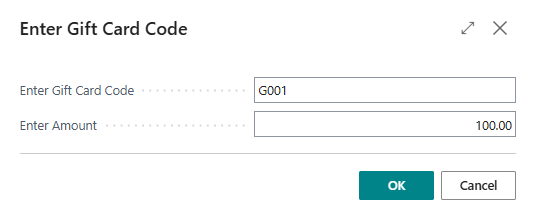
When prompted, enter a unique Gift Card Code and the requested Amount to load onto the card.
Note: The gift card code must be unique. Choose a code that the customer can present at the POS when redeeming the card.
-
Select OK. The gift card item is added to the sales line with the specified amount.
-
Complete payment as normal. After the sale is posted, LS Express creates a new gift card record in the Gift Card List and writes an entry with type Issued to the Gift Card Entries page.
How to: Redeem a gift card at the POS
-
Add items to the sale and proceed to payment.
-
Select the Gift Card payment method.
-
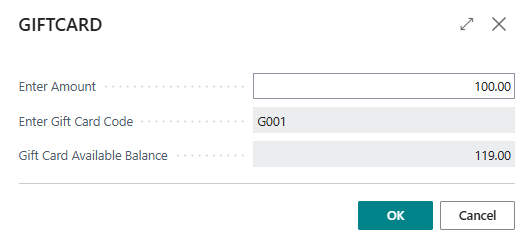
Enter or select the Gift Card Code when prompted. The system displays the remaining balance on the card.
-
Enter the amount to redeem. If the gift card balance is less than the sale total, you can cover the remainder with another payment method.
-
Complete payment. After posting, LS Express writes an entry with type Redeemption to the Gift Card Entries page and updates the remaining balance on the gift card.
Note: Unlike store credit, a gift card is not deactivated after a single use. It remains active as long as the remaining balance is greater than zero.
How to: Top up a gift card
You can add more value to an existing gift card by selling the gift card item again and using the same gift card code.
-
Add the gift card item to the sale.
-
Enter the existing Gift Card Code and the top-up amount.
-
Complete payment. LS Express writes a new Issued entry to the Gift Card Entries page, increasing the remaining balance.
Gift Card List page
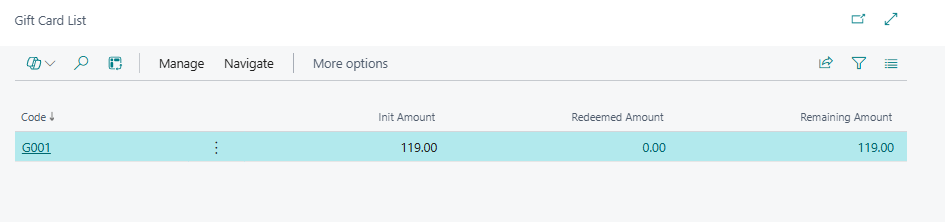
The Gift Card List page shows all gift cards that have been created in the system. Open the page from the role center or by searching for Gift Card List.
| Field | Description |
|---|---|
| Code | Specifies the unique code that identifies the gift card. This is the code the customer presents at the POS to redeem the card. |
| Init Amount | Specifies the amount that was originally loaded onto the gift card when it was first sold. |
| Redeemed Amount | Specifies the total amount that has been redeemed against this gift card. This is a calculated field based on all posted entries with entry type Redeemption. |
| Remaining Amount | Specifies the balance currently available on the gift card. This is a calculated field based on the sum of all posted gift card entries. |
From the Gift Card List, select a gift card and choose Gift Card Entry from the Navigate menu to open the entry history for that card.
Gift Card Entries page
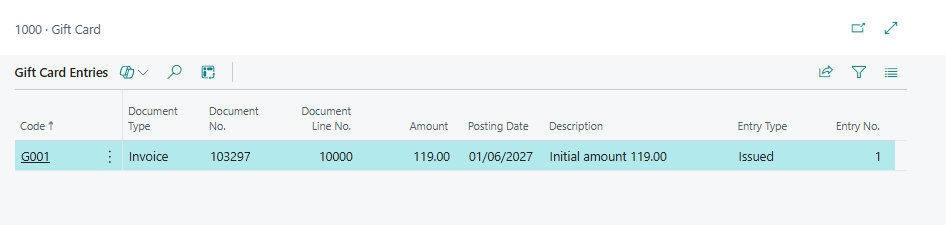
The Gift Card Entries page shows the full transaction history for a gift card. Each posting whether issuing, topping up, or redeeming the card creates a new entry. Open the page from the Gift Card List or the Gift Card card via the Gift Card Entry action.
| Field | Description |
|---|---|
| Code | Specifies the gift card code that the entry belongs to. |
| Item No. | Specifies the item number of the gift card item used in the transaction. |
| Document Type | Specifies the type of document that generated the entry: Invoice or Credit Memo. |
| Document No. | Specifies the document number of the posted sales transaction that created the entry. |
| Document Line No. | Specifies the line number within the source document that the entry relates to. |
| Amount | Specifies the monetary value of the entry. Positive amounts increase the balance (issued or topped up); negative amounts decrease the balance (redeemed). |
| Posting Date | Specifies the date on which the transaction was posted. |
| Description | Specifies a system-generated description of the entry, such as the initial amount loaded, a top-up amount, or the amount redeemed. |
| Entry Type | Specifies whether the entry represents value being added to the card (Issued) or value being used as payment (Redeemption). |
| Entry No. | Specifies the sequential number assigned to the entry when it was created. |
See also
How to: Configure a Payment Method as a Gift Card