Create a TSS
Each store must have at least one Technical Security System (TSS) and one Client ID before recording fiscal transactions.
To create a TSS:
-
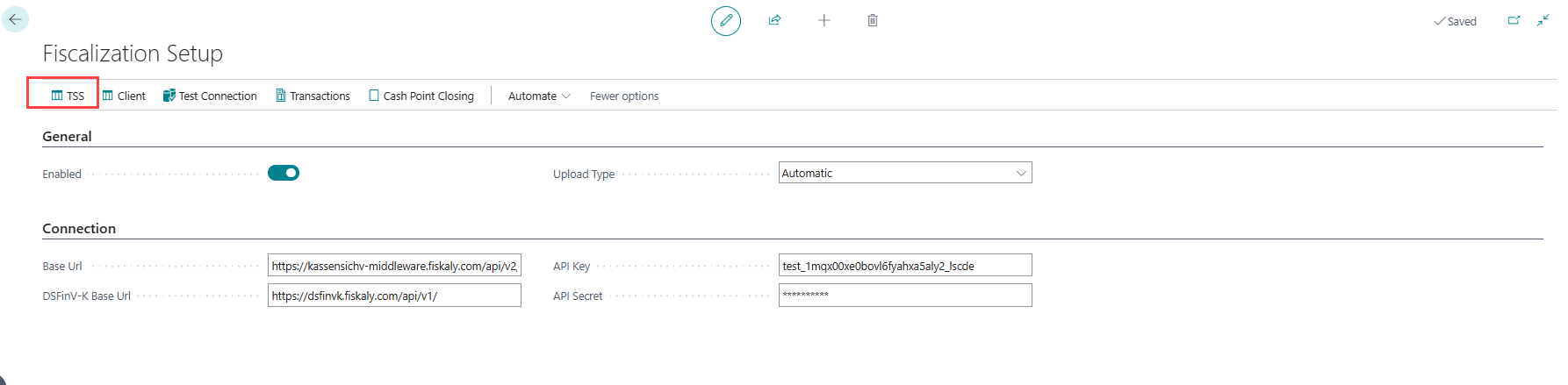
Go to Administration > Navigate > Fiscalization Setup.
-
On the Fiscalization Setup page, select TSS.
-
The TSS page opens.
-
Select Create TSS to generate a new TSS ID for the store.
-
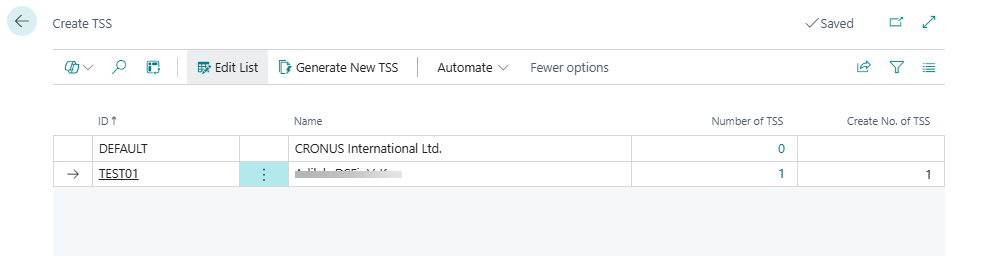
The Create TSS page opens.
-
Enter the number of TSSs to create for the store, then select Generate New TSS.
-
In the confirmation window, select Yes.
-
Select Initial TSS to initialize the newly created TSS ID.
-
Select Refresh TSS to update and view the latest status of all TSS IDs.

How to: Generate a Client ID
Each POS unit needs a Client ID, linked to an initialized TSS, before it can record fiscal transactions.
-
Go to Administration > Navigate > Fiscalization Setup.
-
On the Fiscalization Setup page, select Client.
-
Select the row for the POS unit, and make sure it is linked to an initialized TSS ID.
-
Select Generate Client ID to register a new client ID.

-
Once Fiskaly confirms the registration, the client's status is updated to REGISTERED.

How to: Reassign a Client ID
If a POS unit's client is de-registered on the Fiskaly server (for example, after a TSE de-registration), Generate Client ID does not simply re-use the old client:
-
If the existing Client ID is still in a REGISTERED state on the Fiskaly server, selecting Generate Client ID again does nothing — the existing, still-valid client is kept.
-
If the existing client is not registered (for example, because it was de-registered, or no client has been created yet), selecting Generate Client ID creates a brand-new client ID under the same TSS and registers it. The old client ID is not reactivated or reused.
Note: To recover a POS unit after its client has been de-registered, go to Administration > Navigate > Fiscalization Setup > Client, select the affected POS unit's row, and select Generate Client ID again to register a new client ID.