Fiskaly Tender
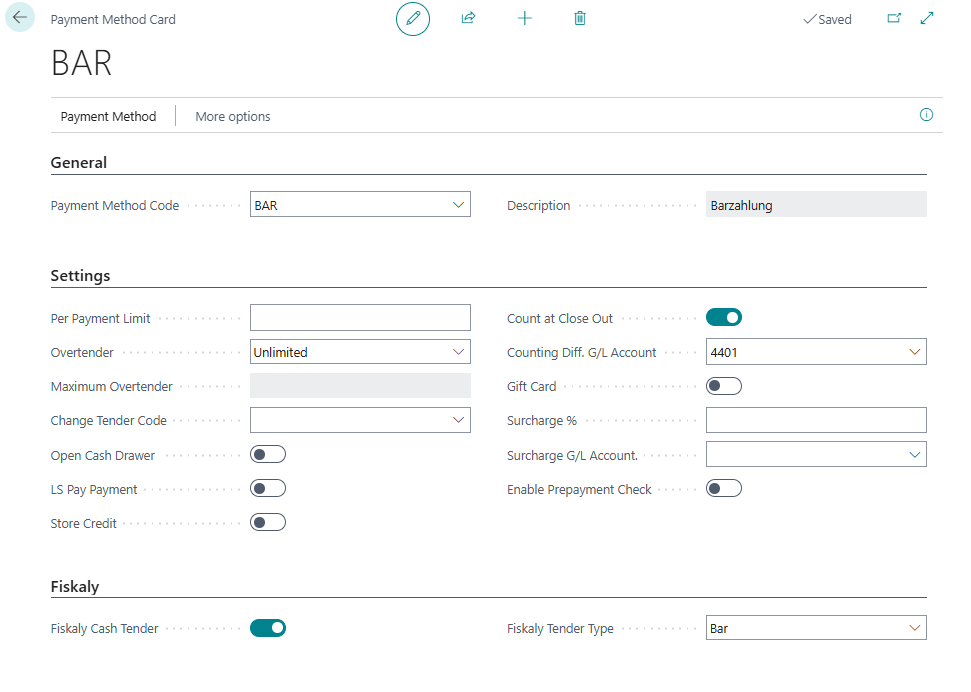
The Fiskaly Tender setup defines which payment methods are used for Fiskaly fiscalization. Each payment method must be linked to a Fiskaly tender type to ensure that transactions are correctly reported to the Fiskaly system during fiscalization.
How to: Set up Fiskaly Tender
To set up Fiskaly VAT tender, follow these steps:
-
Search for Payment Methods, and then select the relevant link.
-
Open the Payment Method Card for the payment method where you want to enable cash tender.
-
On the Fiskaly FastTab, enable the Fiskaly Cash Tender option if the payment method is configured for Fiskaly fiscal integration.
-
In the Fiskaly Tender Type field, select the specific Fiskaly payment method (for example, Bar, EC-Karte, or Kreditkarte).