LS Express POS Receipt, X and Z Report
LS Express POS Receipt
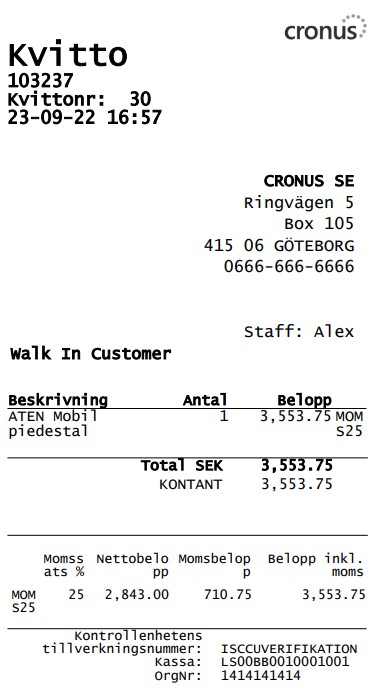
The LS Express POS prints a sales receipt for every sale. This receipt includes the following information required by the Swedish tax authorities:
-
Company name and organization number or social security number
-
The address where sales take place
-
Date and time of the sale
-
Receipt number/Transaction number from an unbroken ascending number series
-
Identification number of the POS Terminal
-
List of items sold and how many units of each item sold
-
Description of service items sold and how many units of each sold
-
Unit price for each item with VAT and total balance for the transaction
-
Total VAT for the transaction
-
Total VAT for each VAT group
-
Payment method/s and total paid by each payment method
-
Control unit’s serial number
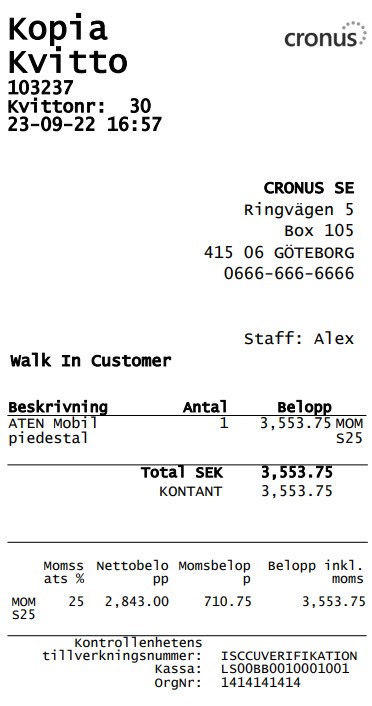
Note: If a sales receipt is re-printed, the receipt header will display the words "COPY(KOPIA)" in accordance to the general requirements for cash registers (SKVFS 2021:17).
LS Express X Report
The POS X-report contains the following information, listed in the same order as in the Swedish Tax agency regulation SKVFS 2021:17 chapter 7:
-
Company name and VAT registration number
-
Date and time the report was produced
-
Information showing it is an X-report
-
POS Terminal ID, Store ID, Staff ID
-
Total sales amount (summed sales amounts)
-
Total sales amounts grouped by category
-
Total VAT grouped by VAT groups
-
Float information
-
Starting Fixed Float
-
Total cash added to drawer
-
Total cash removed from drawer
-
Net float cash (the Ending Fixed Float)
-
-
Number of items sold
-
Number of services sold
-
Number of sales receipts
-
Number of drawer openings
-
Number of receipt copies and amount
-
(Not applicable to LS Express)*
-
Total sales amount grouped by payment methods
-
Number of Returns and total amount
-
Total Discounts
-
Other registrations that reduced the day’s sales
-
Number of Invoices posted to customer account and amount (no payment received)
-
Number of Customer’s previously posted Invoices paid and total amount
-
-
Number of suspended sales and amount
-
Grand total sales
-
Grand total returns
-
Grand total NET
*The regulation section n. calls for the number & amount of transaction in training mode. LS Express does not offer a special training mode in the POS. Users are advised to use the Cronus demo company for training and practicing.

LS Express Z Report
The Z-report will contain all the same information as the X-report listed above, adding:
-
A serial number from an uninterrupted ascending number series for Z reports.
-
Information showing this is a Z-report.
Once a calculated Z-report has been posted, the corresponding sales data is marked and can only belong to one Z-report.
